Data Integrity Gateway (DIG) FAQs
- Do I need to be on the VPN to review course/instructor designations?
- What is Data Integrity Gateway (DIG)?
- Why is DIG important?
- Why must DIG be checked each semester?
- How to check the Evaluation Flag for Courses/Instructors
- What is the enrollment threshold for CIF Blue surveys?
- What to check in DIG?
- When do CIF Blue surveys open and close?
- Where can I find the survey window for a course(s)?
- Where can I find information session videos and slide decks?
Do I need to be on the VPN to review course/instructor designations?
No. The CIF Blue system requires you to authenticate via OKTA, so you should not need to be on the VPN to complete designation review.
What is Data Integrity Gateway (DIG)?
Data Integrity Gateway (DIG) is the portal within CIF Blue used by department chairs and programs directors to designate which courses and instructors are to be evaluated by students using the CIF Blue system and when the students will complete the evaluations.
Why is DIG important?
CIF Blue results are used as input into the tenure and promotion process at the University, therefore, it is important that the correct courses/instructors are evaluated in a timely manner.
Timely and accurate desingation is important to allow sufficient opportunity for students to complete their CIF Blue surveys. If students do not complete their surveys, they will not be able to access their grades or transcripts until six (6) days after grades are released.
Why must DIG be checked each semester?
- Changes from one semester are not carried over to the next semester.
- To ensure that all of the department’s primary courses are listed (contact Registrar if course(s) are missing).
- To ensure that all instructors (including TAs, etc. if they are to be evaluated) are listed for each of the department’s primary courses (contact Registrar if instructor(s) are missing).
- Each instructor for each section of a course is listed separately and the department needs to confirm that each course/instructor’s designation is correct.
- Courses with 6, 7 or 8 as the second digit in the course number are by default marked “N” for do not evaluate, however, the department may decide to change the course/instructor to “Y” to be evaluated.
- Instructors with 1% teaching load will not be evaluated, even if the department marks the instructor “Y” for evaluation. 1% teaching load is to be used for administration purposes and the person does not have teaching responsibilities.
What is the enrollment threshold for CIF Blue surveys?
Course sections with 2 or fewer students enrolled at the time the survey is scheduled to open will not be evaluated. This is an effort to ensure student confidentiality and appropriate interpretation of the statistical significance of results.
What to check in DIG?
Carefully consider whether course sections with low enrollment should be evaluated since the CIF system strives to ensure student confidentiality and appropriate interpretation of the statistical significance of results.
- Determine which courses/instructors should be evaluated and make sure they are marked “Y” under Evaluation Flag.
- Determine which courses/instructors should NOT be evaluated and make sure they are marked “N” under Evaluation Flag.
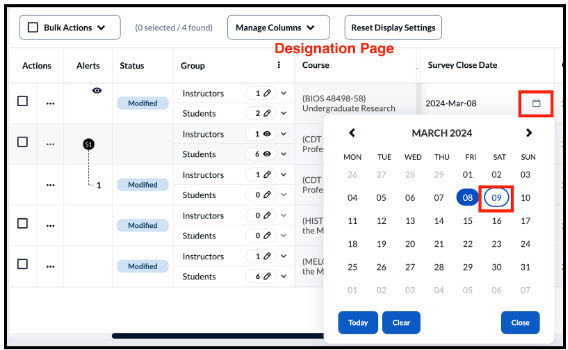
- Determine if the Survey Close Date is accurate and change if necessary.
You can find step-by-step instructions on how to review and change course-instructor designations in the DIG - CIF Blue QRG.
When do CIF Blue surveys open and close?
CIF Blue Survey Open Date:
- Surveys always open at 5:00 a.m. ET. on the CIF Blue Survey Begin Date.
- Begin dates cannot be changed, however, the Survey Close Date can be and that in affect changes the Survey Begin Date.
CIF Blue Survey Close Date:
- Surveys always close at 11:59 p.m. ET. on the Survey Close Date.
- Survey close dates cannot be changed once a survey opens.
The max number of days a CIF Blue survey is open to students is thirteen (13) and cannot be extended for longer durations.
Where can I find information session videos and slide decks?
The CIF Blue team holds periodic information and training sessions for the various components of the CIF Blue process. You can find the session recordings under Additional Resources.